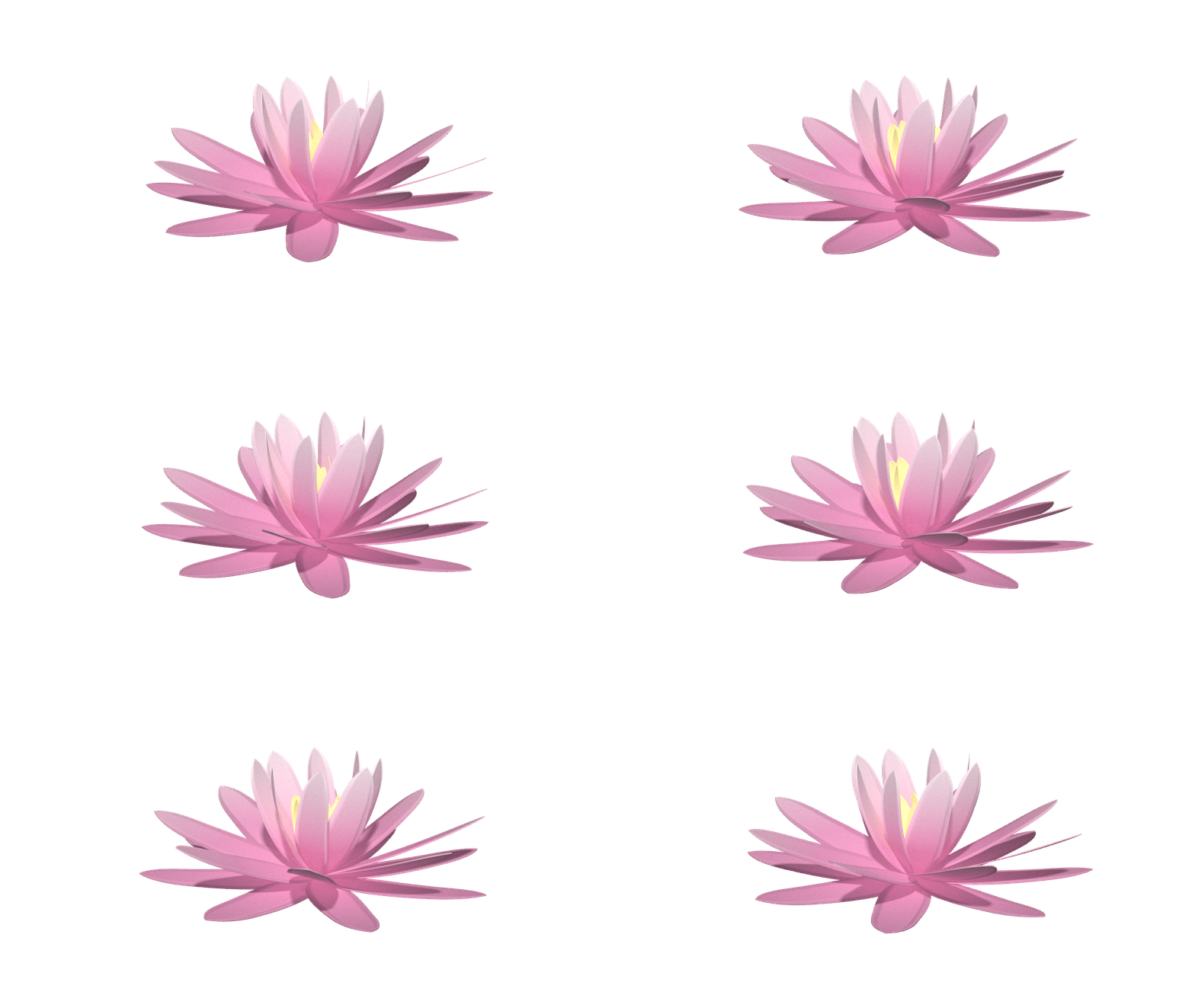
Used in the production of Brew Who


main_Custom_OSL_Shader_Amanda_Rabade
#### Amanda Rabade
#### 5/30/24
#### Professor Nikolic
#### VSFX 755

import texture_file_aiSS as textSS
import texture_file_aiToon as textToon
import procedural_aiToon as procToon
import procedural_aiSS as procSS
import maya.cmds as cmds
import sys
import importlib


class Custom_Shader_Window(object):

    def __init__(self):

        self.window = "AR_Window"
        self.win_title = "Custom Shader"
        self.mat_title = "Material"
        self.attr_title = "Attributes"
        self.type_title = "Shading Type"
        self.search_title = "Search for Textures"
        self.size = (400, 400)
        self.attr_1 = 0
        self.attr_2 = 0
        self.attr_3 = 0
        self.attr_4 = 0
        self.attr_5 = 0
        self.attr_6 = 0
        self.attr_7 = 0

        #  close old window is open
        if cmds.window(self.window, exists=1):
            cmds.deleteUI(self.window, window=1)

        #  create new window
        self.window = cmds.window(self.window, title=self.win_title, widthHeight=self.size)
        frame = cmds.frameLayout()

        #  determines where widgets are located relative to size of window
        self.win_layout = cmds.frameLayout(frame, label = self.mat_title, edit=1)
        cmds.separator(style = "single")

        #  material dropdown menu
        self.attrs = cmds.optionMenu()
        cmds.menuItem(l='aiStandardSurface')
        cmds.menuItem(l='aiToon')
        cmds.menuItem(l='aiFlat')
        cmds.menuItem(l='Lambert')
        cmds.menuItem(l='Blinn')
        cmds.menuItem(l='Phong')
        cmds.menuItem(l='standardSurface')

        #  new layout for attributes
        form = cmds.formLayout(numberOfDivisions=100)
        cmds.separator(style = "single")
        cmds.setParent("..")
        self.win_layout = cmds.frameLayout(frame, label = self.attr_title)

        #  available attributes for the selected material (only available for procedural)
        self.attr_list_1 = cmds.checkBoxGrp(numberOfCheckBoxes = 3, labelArray3 = ['Metalness', 'Emission Weight', 'Displacement'],
                                            enable = 0, changeCommand = self.attr_select)
        self.attr_list_2 = cmds.checkBoxGrp(numberOfCheckBoxes = 2, labelArray2 = ['Base Color', 'Emission Color'],
                                            enable = 0, changeCommand = self.attr_select)
        self.attr_list_3 = cmds.checkBoxGrp(numberOfCheckBoxes = 2, labelArray2 = ['Bump Value', 'Specular Roughness'],
                                            enable = 0, changeCommand = self.attr_select)

        #  new layout for radio buttons
        form = cmds.formLayout(numberOfDivisions=100)
        cmds.separator(style = "single")
        cmds.setParent("..")
        self.win_layout = cmds.frameLayout(frame, label = self.type_title)

        #  procedural and texture files to determine which script will run
        self.radio_butts = cmds.radioButtonGrp(la2=['Procedural', 'Texture Files'], nrb=2, on1=self.do_procedural,
                                               sl=2, on2=self.do_txt_f,
                                               an1='Can work on any objects. Will add procedural noise textures that can be customized by the user.',
                                               an2='Only works on objects with the same UVs. User can browse for desired texture files.')

        #  new layout for search bar
        form = cmds.formLayout(numberOfDivisions=100)
        cmds.separator(style = "single")
        cmds.setParent("..")
        self.win_layout = cmds.frameLayout(frame, label = self.search_title)

        #  displays file path for selected image
        #  browses for files so user can select image for texture file (non-procedural)
        self.browse_field = cmds.textFieldButtonGrp(pht='Texture File Here', ann='Click "Browse" to search for texture file.',
                                                    w=240, buttonLabel = 'Browse', buttonCommand = self.do_browse_butt)

        #  button user clicks to run final code
        create_butt = cmds.button(l='Create', w=150, aop=1, command = self.do_butt)

        #  displays instructions for widgets when user hovers over
        help_txt = cmds.helpLine()

        cmds.showWindow(self.window)

    #  these functions ensure the option menu is working properly
    def do_flat(self):
        print('aiFlat')

    def do_toon(self):
        print('aiToon')

    def do_lambert(self):
        print('Lambert')

    def do_ai_ss(self):
        print('aiStandardSurface')

    def do_blinn(self):
        print('Blinn')

    def do_phong(self):
        print('Phong')

    def do_standard_s(self):
        print('Standard Surface')

    #  only here for testing purposes
    def do_nothing(self):
        pass

    #  alters GUI elements
    def do_procedural(self, *args):
        print('Procedural')
        cmds.disable(self.browse_field)
        cmds.disable(self.attr_list_1, v=0)
        cmds.disable(self.attr_list_2, v=0)
        cmds.disable(self.attr_list_3, v=0)

    #  alters GUI elements
    def do_txt_f(self, *args):
        print('Texture Files')
        cmds.disable(self.browse_field, v=0)
        cmds.disable(self.attr_list_1)
        cmds.disable(self.attr_list_2)
        cmds.disable(self.attr_list_3)

    #  allows user to browse for texture files
    def do_browse_butt(self, *args):
        basicFilter = "All Files (*.*)"
        global img_dir
        img_dir = cmds.fileDialog2(ff=basicFilter, dialogStyle=2, fm=1)
        hold_path = cmds.textFieldButtonGrp(self.browse_field, edit=1, tx=img_dir[0])
        print(img_dir[0])

    #  selected check boxes will determine which OSL nodes will be created
    def attr_select(self, *args):
        #  first row of check boxes
        self.attr_1 = cmds.checkBoxGrp(self.attr_list_1, q = 1, value1 = 1)
        self.attr_2 = cmds.checkBoxGrp(self.attr_list_1, q = 1, value2 = 1)
        self.attr_3 = cmds.checkBoxGrp(self.attr_list_1, q = 1, value3 = 1)
        if self.attr_1 == 1:
            print("Metalness")
        if self.attr_2 == 1:
            print("Emission Weight")
        if self.attr_3 == 1:
            print("Displacement")

        #  second row of check boxes
        self.attr_4 = cmds.checkBoxGrp(self.attr_list_2, q = 1, value1 = 1)
        self.attr_5 = cmds.checkBoxGrp(self.attr_list_2, q = 1, value2 = 1)
        if self.attr_4 == 1:
            print("Base Color")
        if self.attr_5 == 1:
            print("Emission Color")

        #  third row of check boxes
        self.attr_6 = cmds.checkBoxGrp(self.attr_list_3, q = 1, value1 = 1)
        self.attr_7 = cmds.checkBoxGrp(self.attr_list_3, q = 1, value2 = 1)
        if self.attr_6 == 1:
            print("Bump Value")
        if self.attr_7 == 1:
            print("Specular Roughness")

    #  will run sub modules to create custom shaders determined by user selected inputs
    def do_butt(self, *args):
        #  selected button will determine procedural or texture based shading
        value = cmds.radioButtonGrp(self.radio_butts, q=1, select=1)
        #  selected item will determine which material is used
        mat = cmds.optionMenu(self.attrs, q=1, select=1)
        #  selected check boxes will determine which OSL nodes will be created
        #  first row of check boxes
        self.attr_1 = cmds.checkBoxGrp(self.attr_list_1, q = 1, value1 = 1)
        self.attr_2 = cmds.checkBoxGrp(self.attr_list_1, q = 1, value2 = 1)
        self.attr_3 = cmds.checkBoxGrp(self.attr_list_1, q = 1, value3 = 1)
        #  second row of check boxes
        self.attr_4 = cmds.checkBoxGrp(self.attr_list_2, q = 1, value1 = 1)
        self.attr_5 = cmds.checkBoxGrp(self.attr_list_2, q = 1, value2 = 1)
        #  third row of check boxes
        self.attr_6 = cmds.checkBoxGrp(self.attr_list_3, q = 1, value1 = 1)
        self.attr_7 = cmds.checkBoxGrp(self.attr_list_3, q = 1, value2 = 1)

        if value == 1 and mat == 1:
            print('proc aiSS')
            procSS.set_up()

            ChBox ={"metal":self.attr_1, "emission":self.attr_2, "disp":self.attr_3,
                   "color":self.attr_4, "emit_color":self.attr_5,
                   "bump":self.attr_6, "spec_rough":self.attr_7}

            if(ChBox["metal"]):
                print("run OSL_metal")
                procSS.osl_metal()
            if(ChBox["emission"]):
                print("run OSL_emit")
                procSS.osl_emission()
            if(ChBox["disp"]):
                print("run OSL_disp")
                procSS.osl_disp()
            if(ChBox["color"]):
                print("run OSL_color")
                procSS.osl_color()
            if(ChBox["emit_color"]):
                print("run OSL_emit_color")
                procSS.osl_emission_color()
            if(ChBox["bump"]):
                print("run OSL_bump")
                procSS.osl_bump()
            if(ChBox["spec_rough"]):
                print("run OSL_spec_rough")
                procSS.osl_rough()

        if value == 2 == mat:
            print ('text aiToon')
            textToon.Shader_Creation(img_dir)
            # test.Shader_Creation(img_dir)
        if mat == 2 > value:
            print('proc aiToon')
            procToon.procedural()
        if value == 2 > mat:
            print('text aiSS')
            textSS.Shader_Creation(img_dir)
        if value == 1 and mat == 3:
            print('proc aiFlat')
        if value == 2 and mat == 3:
            print('text aiFlat')
        if value == 1 and mat == 4:
            print('proc lambert')
        if value == 2 and mat == 4:
            print('text lambert')
        if value == 1 and mat == 5:
            print('proc blinn')
        if value == 2 and mat == 5:
            print('text blinn')
        if value == 1 and mat == 6:
            print('proc phong')
        if value == 2 and mat == 6:
            print('text phong')
        if value == 1 and mat == 7:
            print('proc SS')
        if value == 2 and mat == 7:
            print('text ss')


myWindow = Custom_Shader_Window()
importlib.reload(procSS)
procedural_aiSS
#### works procedurally
#### only aiStandardSurface

import maya.cmds as cmds
import mtoa.utils as mutils

def set_up():
    #  creates material, OSL nodes, and makes proper connections
    selected = cmds.ls(sl=True,long=True)
    cmds.shadingNode('aiStandardSurface', asShader=True)
    cmds.select(selected)
    cmds.hyperShade(assign='aiStandardSurface1')
    cmds.rename('aiStandardSurface1', 'aiSS_custom_SN')

def osl_color():
    #  adds attributes to shape nodes of selected objects
    selected = cmds.ls(sl=True,long=True)
    for obj in selected:
        shape_node = cmds.listRelatives(obj, shapes=True)
        print(shape_node)
        cmds.addAttr(shape_node[0], longName='mtoa_constant_color_A', niceName='Color_A', usedAsColor=True,
                     attributeType='float3')
        cmds.addAttr(shape_node[0], longName='R', attributeType='float', parent='mtoa_constant_color_A', dv=1)
        cmds.addAttr(shape_node[0], longName='G', attributeType='float', parent='mtoa_constant_color_A', dv=0)
        cmds.addAttr(shape_node[0], longName='B', attributeType='float', parent='mtoa_constant_color_A', dv=1)
        cmds.addAttr(shape_node[0], longName='mtoa_constant_color_B', niceName='Color_B', usedAsColor=True,
                     attributeType='float3')
        cmds.addAttr(shape_node[0], longName='Red', attributeType='float', parent='mtoa_constant_color_B')
        cmds.addAttr(shape_node[0], longName='Green', attributeType='float', parent='mtoa_constant_color_B')
        cmds.addAttr(shape_node[0], longName='Blue', attributeType='float', parent='mtoa_constant_color_B', dv=1)
        cmds.addAttr(shape_node[0], longName='mtoa_constant_color_C', niceName='Color_C', usedAsColor=True,
                     attributeType='float3')
        cmds.addAttr(shape_node[0], longName='rojo', attributeType='float', parent='mtoa_constant_color_C',
                     dv=0.0493827)
        cmds.addAttr(shape_node[0], longName='verde', attributeType='float', parent='mtoa_constant_color_C',
                     dv=0.0493827)
        cmds.addAttr(shape_node[0], longName='azul', attributeType='float', parent='mtoa_constant_color_C',
                     dv=0.0493827)

    #  creates color node
    cmds.shadingNode('aiOslColor', asUtility = 1)

    cmds.connectAttr('aiOslColor1.message', 'aiSS_custom_SN.baseColor')

    cmds.select(selected)

def osl_metal():
    #  adds attributes to shape nodes of selected objects
    selected = cmds.ls(sl=True,long=True)
    for obj in selected:
        shape_node = cmds.listRelatives(obj, shapes=True)
        print(shape_node)
        #  creates attributes on shape node
        cmds.addAttr(shape_node[0], longName = 'mtoa_constant_metalness', niceName='Metalness', at = 'float', dv=0.5,
                     min=0.0, max=1)

    #  creates metal node
    cmds.shadingNode('aiOslMetal', asUtility = 1)

    cmds.connectAttr('aiOslMetal1.message', 'aiSS_custom_SN.metalness')

    cmds.select(selected)

def osl_emission():
    #  adds attributes to shape nodes of selected objects
    selected = cmds.ls(sl=True,long=True)
    for obj in selected:
        shape_node = cmds.listRelatives(obj, shapes=True)
        print(shape_node)
        #  creates attributes on shape node
        cmds.addAttr(shape_node[0], longName='mtoa_constant_emission', niceName='Emission', at='float', dv=1 )

    #  creates emission node
    cmds.shadingNode('aiOslEmission', asUtility = 1)

    cmds.connectAttr('aiOslEmission1.message', 'aiSS_custom_SN.emission')

    cmds.select(selected)

def osl_emission_color():
    #  adds attributes to shape nodes of selected objects
    selected = cmds.ls(sl=True,long=True)
    for obj in selected:
        shape_node = cmds.listRelatives(obj, shapes=True)
        print(shape_node)
        #  creates attributes on shape node
        cmds.addAttr(shape_node[0], longName='mtoa_constant_emission_color', niceName='Emission_Color', usedAsColor=True,
                     at='float3' )
        cmds.addAttr(shape_node[0], longName='red', attributeType='float', parent='mtoa_constant_emission_color',
                     dv = 1 )
        cmds.addAttr(shape_node[0], longName='green', attributeType='float', parent='mtoa_constant_emission_color',
                     dv = 0 )
        cmds.addAttr(shape_node[0], longName='blue', attributeType='float', parent='mtoa_constant_emission_color',
                     dv = 1 )

    #  creates emission color node
    cmds.shadingNode('aiOslEmissionColor', asUtility = 1)

    cmds.connectAttr('aiOslEmissionColor1.message', 'aiSS_custom_SN.emissionColor')

    cmds.select(selected)

def osl_rough():
    #  adds attributes to shape nodes of selected objects
    selected = cmds.ls(sl=True,long=True)
    for obj in selected:
        shape_node = cmds.listRelatives(obj, shapes=True)
        print(shape_node)
        #  creates attributes on shape node
        cmds.addAttr(shape_node[0], ln = 'mtoa_constant_roughVal', niceName = 'Rough_Val', at = 'float', dv=1, min=0.0,
                     max=1)

    #  creates roughness node
    cmds.shadingNode('aiOslRoughness', asUtility = 1)

    cmds.connectAttr('aiOslRoughness1.message', 'aiSS_custom_SN.specularRoughness')

    cmds.select(selected)

def osl_bump():
    #  adds attributes to shape nodes of selected objects
    selected = cmds.ls(sl=True,long=True)
    for obj in selected:
        shape_node = cmds.listRelatives(obj, shapes=True)
        print(shape_node)
        #  creates attributes on shape node
        cmds.addAttr(shape_node[0], ln = 'mtoa_constant_bumpVal', nn = 'Bump_Val', at = 'float', dv = 1, min = 0,
                     max = 1)

    #  creates bump node
    cmds.shadingNode('bump2d', asUtility = 1)
    cmds.shadingNode('aiOslBump', asShader = 1)

    cmds.connectAttr('aiOslBump1.message', 'bump2d1.bumpValue')
    cmds.connectAttr( 'bump2d1.outNormal', 'aiSS_custom_SN.normalCamera' )

    cmds.select(selected)

def osl_disp():
    #  adds attributes to shape nodes of selected objects
    selected = cmds.ls(sl=True,long=True)
    for obj in selected:
        shape_node = cmds.listRelatives(obj, shapes=True)
        print(shape_node)
        #  creates attributes on shape node
        cmds.addAttr(shape_node[0], ln='mtoa_constant_noiseAmp', nn='Noise_Amplitude', at='float', dv=5, min=0, max=10)
        cmds.addAttr(shape_node[0], ln='mtoa_constant_dispAmp1', nn='Displacement_Amplitude1', at='float', dv=0.9,
                     min=0, max=10)
        cmds.addAttr(shape_node[0], ln='mtoa_constant_dispAmp2', nn='Displacement_Amplitude2', at='float', dv=0, min=0,
                     max=10)
        cmds.addAttr(shape_node[0], ln='mtoa_constant_noiseFreq', nn='Noise_Frequency', at='float', dv=0.5, min=0,
                     max=10)
        cmds.addAttr(shape_node[0], ln='mtoa_constant_dispFreq1', nn='Displacement_Frequency1', at='float', dv=0.9,
                     min=0, max=10)
        cmds.addAttr(shape_node[0], ln='mtoa_constant_dispFreq2', nn='Displacement_Frequency2', at='float', dv=0.8,
                     min=0, max=10)

    #  creates displacement node
    cmds.shadingNode('aiOslDisplacement', asUtility = 1)

    cmds.connectAttr('aiOslDisplacement1.message', 'aiStandardSurface1SG.displacementShader')

    cmds.select(selected)
procedural_aiToon
####  works procedurally
#### only aiToon

import maya.cmds as cmds

def procedural():
    #  adds attributes to shape nodes of selected objects
    selected = cmds.ls(sl=True,long=True)
    print(len(selected))
    for obj in selected:
        shape_node = cmds.listRelatives(obj, shapes=True)
        print(shape_node)
        #  creates attributes on shape node
        cmds.addAttr(shape_node[0], longName='mtoa_constant_emission', niceName='Emission', at='float', dv=1 )
        cmds.addAttr(shape_node[0], longName='mtoa_constant_emission_color', niceName='Emission_Color', usedAsColor=True,
                     at='float3' )
        cmds.addAttr(shape_node[0], longName='red', attributeType='float', parent='mtoa_constant_emission_color',
                     dv = 1 )
        cmds.addAttr(shape_node[0], longName='green', attributeType='float', parent='mtoa_constant_emission_color',
                     dv = 0 )
        cmds.addAttr(shape_node[0], longName='blue', attributeType='float', parent='mtoa_constant_emission_color',
                     dv = 1 )
        cmds.addAttr(shape_node[0], longName='mtoa_constant_color_A', niceName='Color_A', usedAsColor=True,
                     attributeType='float3')
        cmds.addAttr(shape_node[0], longName='R', attributeType='float', parent='mtoa_constant_color_A', dv=1)
        cmds.addAttr(shape_node[0], longName='G', attributeType='float', parent='mtoa_constant_color_A', dv=0)
        cmds.addAttr(shape_node[0], longName='B', attributeType='float', parent='mtoa_constant_color_A', dv=1)
        cmds.addAttr(shape_node[0], longName='mtoa_constant_color_B', niceName='Color_B', usedAsColor=True,
                     attributeType='float3')
        cmds.addAttr(shape_node[0], longName='Red', attributeType='float', parent='mtoa_constant_color_B')
        cmds.addAttr(shape_node[0], longName='Green', attributeType='float', parent='mtoa_constant_color_B')
        cmds.addAttr(shape_node[0], longName='Blue', attributeType='float', parent='mtoa_constant_color_B', dv=1)
        cmds.addAttr(shape_node[0], longName='mtoa_constant_color_C', niceName='Color_C', usedAsColor=True,
                     attributeType='float3')
        cmds.addAttr(shape_node[0], longName='rojo', attributeType='float', parent='mtoa_constant_color_C',
                     dv=0.0493827)
        cmds.addAttr(shape_node[0], longName='verde', attributeType='float', parent='mtoa_constant_color_C',
                     dv=0.0493827)
        cmds.addAttr(shape_node[0], longName='azul', attributeType='float', parent='mtoa_constant_color_C',
                     dv=0.0493827)
        cmds.addAttr(shape_node[0], longName='mtoa_constant_color_D', niceName='Color_D', usedAsColor=True,
                     attributeType='float3')
        cmds.addAttr(shape_node[0], longName='Rojo', attributeType='float', parent='mtoa_constant_color_D', dv=1)
        cmds.addAttr(shape_node[0], longName='Verde', attributeType='float', parent='mtoa_constant_color_D', dv=1)
        cmds.addAttr(shape_node[0], longName='Azul', attributeType='float', parent='mtoa_constant_color_D', dv=1)
        cmds.addAttr(shape_node[0], ln = 'mtoa_constant_roughVal', niceName = 'Rough_Val', at = 'float', dv=1, min=0.0,
                     max=1)
        cmds.addAttr(shape_node[0], ln = 'mtoa_constant_bumpVal', nn = 'Bump_Val', at = 'float', dv = 1, min = 0,
                     max = 1)
        cmds.addAttr(shape_node[0], ln='mtoa_constant_noiseAmp', nn='Noise_Amplitude', at='float', dv=5, min=0, max=10)
        cmds.addAttr(shape_node[0], ln='mtoa_constant_dispAmp1', nn='Displacement_Amplitude1', at='float', dv=0.9,
                     min=0, max=10)
        cmds.addAttr(shape_node[0], ln='mtoa_constant_dispAmp2', nn='Displacement_Amplitude2', at='float', dv=0, min=0,
                     max=10)
        cmds.addAttr(shape_node[0], ln='mtoa_constant_noiseFreq', nn='Noise_Frequency', at='float', dv=0.5, min=0,
                     max=10)
        cmds.addAttr(shape_node[0], ln='mtoa_constant_dispFreq1', nn='Displacement_Frequency1', at='float', dv=0.9,
                     min=0, max=10)
        cmds.addAttr(shape_node[0], ln='mtoa_constant_dispFreq2', nn='Displacement_Frequency2', at='float', dv=0.8,
                     min=0, max=10)

    #  creates material, OSL nodes, and makes proper connections
    cmds.shadingNode('aiToon', asShader=True)
    cmds.select(selected)
    cmds.hyperShade(assign='aiToon1')
    cmds.rename('aiToon1', 'aiToon_custom_SN')
    cmds.polySphere(name='null')
    cmds.listRelatives('null', shapes=True)
    cmds.shadingNode('aiOslShader', n='aiOslColor', asShader=True)
    cmds.connectAttr('aiOslColor.outValue', 'aiToon_custom_SN.baseColor')
    cmds.select('null')
    cmds.addAttr(ln='OSL_color_code', dt='string')
    cmds.setAttr('null.OSL_color_code', typ='string')
    cmds.connectAttr('null.OSL_color_code', 'aiOslColor.code')
    cmds.hide('null')
    cmds.setAttr('null.OSL_color_code', 'shader base\n\n(\n\noutput color resultDiffuse = 1\n\n)\n\n{\n    color A = 0;\n    color B = 0;\n    color C = 0;\n    color D = 0;\n    float DispNoise1 = 0;\n    float DispNoise2 = 0;\n    float Noise = 0;\n    \n    //sliders to control specular roughness and bump intensities\n    float roughVal = 0.5;\n    float bumpVal = 0.5;\n\n    //sliders to control amplitude of noise\n    float noise_amp = 0.5;\n    float disp_amp1 = 0.5;\n    float disp_amp2 = 0.5;\n\n    //sliders to control frequency of noise\n    float noise_freq = 0.5;\n    float disp_freq1 = 0.5;\n    float disp_freq2 = 0.5;\n    \n    //sliders to turn on/off animation and to control speed of animation\n    float speed = 0.5;\n    int anim = 0;\n    \n    //sliders to manipulate noise\n    float Mask = 1;\n    float Multi = 1;\n    float stretch = 1;\n\n   //each noise placed in object space with amplitude and frequency sliders used. animation variable added for animation\n\n    getattribute(\"color_A\",A);\n    getattribute(\"color_B\",B);\n    getattribute(\"color_C\",C);\n    getattribute(\"color_D\",D);\n    getattribute(\"dispAmp1\", disp_amp1);\n    getattribute(\"dispAmp2\", disp_amp2);\n    getattribute(\"dispFreq1\", disp_freq1);\n    getattribute(\"dispFreq2\", disp_freq2);\n    getattribute(\"noiseAmp\", noise_amp);\n    getattribute(\"noiseFreq\", noise_freq);\n\n   color dispNoise1 = mix(1.0, noise(\"perlin\",(transform(\"object\",P) * disp_freq1)+(time*speed*(anim*.3))), disp_amp1);\n   color dispNoise2 = mix(1.0, noise(\"usimplex\",(transform(\"object\",P) * disp_freq2)+(time*speed*(anim*.3))), disp_amp2);\n   color Noize = mix(1.0, noise(\"usimplex\",(transform(\"object\",P) * noise_freq)+(time*speed*(anim*.3))), noise_amp);\n   color mainColor = (mix((A*C)*(10*dispNoise1[2]),B*dispNoise2[1],dispNoise1[2]*dispNoise2[0]));\n\n   resultDiffuse = mainColor;\n}', typ = 'string')
    cmds.shadingNode( 'aiOslShader', n='aiOslEmission', asShader=True )
    cmds.connectAttr( 'aiOslEmission.outValue', 'aiToon_custom_SN.emission' )
    cmds.select('null')
    cmds.addAttr(ln = 'OSL_emisison_code', dt = 'string')
    cmds.connectAttr( 'null.OSL_emisison_code', 'aiOslEmission.code' )
    cmds.setAttr('null.OSL_emisison_code','shader base\n\n(\n\noutput color resultEmiss = 1\n\n)\n\n{\n\ncolor myFloat = 1;\n\ngetattribute(\"emission\",myFloat);\n\nresultEmiss = myFloat;\n\n}', typ = 'string')
    cmds.shadingNode( 'aiOslShader', n='aiOslEmissionColor', asShader=True )
    cmds.connectAttr( 'aiOslEmissionColor.outValue', 'aiToon_custom_SN.emissionColor' )
    cmds.select('null')
    cmds.addAttr(ln = 'OSL_emisison_color_code', dt = 'string')
    cmds.setAttr( 'null.OSL_emisison_color_code', typ = 'string' )
    cmds.connectAttr( 'null.OSL_emisison_color_code', 'aiOslEmissionColor.code' )
    cmds.setAttr('null.OSL_emisison_color_code', 'shader base\n\n(\n\noutput color resultDiffuse = 1\n\n)\n\n{\n    color A = 0;\n    color B = 0;\n    color C = 0;\n    color D = 0;\n    float DispNoise1 = 0;\n    float DispNoise2 = 0;\n    float Noise = 0;\n    \n    //sliders to control specular roughness and bump intensities\n    float roughVal = 0.5;\n    float bumpVal = 0.5;\n\n    //sliders to control amplitude of noise\n    float noise_amp = 0.5;\n    float disp_amp1 = 0.5;\n    float disp_amp2 = 0.5;\n\n    //sliders to control frequency of noise\n    float noise_freq = 0.5;\n    float disp_freq1 = 0.5;\n    float disp_freq2 = 0.5;\n    \n    //sliders to turn on/off animation and to control speed of animation\n    float speed = 0.5;\n    int anim = 0;\n    \n    //sliders to manipulate noise\n    float Mask = 1;\n    float Multi = 1;\n    float stretch = 1;\n\n   //each noise placed in object space with amplitude and frequency sliders used. animation variable added for animation\n\n    getattribute(\"color_A\",A);\n    getattribute(\"color_B\",B);\n    getattribute(\"color_C\",C);\n    getattribute(\"color_D\",D);\n    getattribute(\"dispAmp1\", disp_amp1);\n    getattribute(\"dispAmp2\", disp_amp2);\n    getattribute(\"dispFreq1\", disp_freq1);\n    getattribute(\"dispFreq2\", disp_freq2);\n    getattribute(\"noiseAmp\", noise_amp);\n    getattribute(\"noiseFreq\", noise_freq);\n\n   color dispNoise1 = mix(1.0, noise(\"perlin\",(transform(\"object\",P) * disp_freq1)+(time*speed*(anim*.3))), disp_amp1);\n   color dispNoise2 = mix(1.0, noise(\"usimplex\",(transform(\"object\",P) * disp_freq2)+(time*speed*(anim*.3))), disp_amp2);\n   color Noize = mix(1.0, noise(\"usimplex\",(transform(\"object\",P) * noise_freq)+(time*speed*(anim*.3))), noise_amp);\n   color mainColor = (mix((A*C)*(10*dispNoise1[2]),B*dispNoise2[1],dispNoise1[2]*dispNoise2[0]));\n\n   resultDiffuse = mainColor;\n}', typ = 'string')
    cmds.shadingNode( 'aiOslShader', n='aiOslRoughness', asShader=True )
    cmds.connectAttr( 'aiOslRoughness.outValue', 'aiToon_custom_SN.specularRoughness' )
    cmds.select('null')
    cmds.addAttr(ln = 'OSL_roughness_code', dt = 'string')
    cmds.setAttr( 'null.OSL_roughness_code', typ = 'string' )
    cmds.connectAttr( 'null.OSL_roughness_code', 'aiOslRoughness.code' )
    cmds.setAttr('null.OSL_roughness_code', 'shader base\n\n(\n\noutput color resultRough = 1\n\n)\n\n{\n\n    float roughVal = 1;\n    float bumpVal = 0.5;\n\n    //sliders to control amplitude of noise\n    float noise_amp = 10;\n    float disp_amp1 = 0.5;\n    float disp_amp2 = 0.5;\n\n    //sliders to control frequency of noise\n    float noise_freq = 1;\n    float disp_freq1 = 0.5;\n    float disp_freq2 = 0.5;\n    \n    //sliders to turn on/off animation and to control speed of animation\n    float speed = 0.5;\n    int anim = 0;\n    \n    //sliders to manipulate noise\n    float Mask = 1;\n    float Multi = 1;\n    float stretch = 1;\n\n   //each noise placed in object space with amplitude and frequency sliders used. animation variable added for animation\n\n    getattribute(\"roughVal\", roughVal);\n    getattribute(\"dispAmp1\", disp_amp1);\n    getattribute(\"dispAmp2\", disp_amp2);\n    getattribute(\"dispFreq1\", disp_freq1);\n    getattribute(\"dispFreq2\", disp_freq2);\n    getattribute(\"noiseAmp\", noise_amp);\n    getattribute(\"noiseFreq\", noise_freq);\n\n   color dispNoise1 = mix(1.0, noise(\"perlin\",(transform(\"object\",P) * disp_freq1)+(time*speed*(anim*.3))), disp_amp1);\n   color dispNoise2 = mix(1.0, noise(\"usimplex\",(transform(\"object\",P) * disp_freq2)+(time*speed*(anim*.3))), disp_amp2);\n   color Noise = mix(1.0, noise(\"usimplex\",(transform(\"object\",P) * noise_freq)+(time*speed*(anim*.3))), noise_amp);\n   color specRoughness = roughVal*(dispNoise1[2]*dispNoise2[1]*Noise[0]);\n    resultRough = specRoughness;\n}', typ = 'string')
    cmds.shadingNode( 'aiOslShader', n='aiOslBump', asShader=True )
    cmds.shadingNode('bump2d', asShader = True)
    cmds.connectAttr( 'aiOslBump.outValue', 'bump2d1.bumpValue' )
    cmds.connectAttr( 'bump2d1.outNormal', 'aiToon_custom_SN.normalCamera' )
    cmds.select('null')
    cmds.addAttr(ln = 'OSL_bump_code', dt = 'string')
    cmds.setAttr( 'null.OSL_bump_code', typ = 'string' )
    cmds.connectAttr( 'null.OSL_bump_code', 'aiOslBump.code' )
    cmds.setAttr('null.OSL_bump_code', 'shader base\n\n(\n\noutput color resultBump = 1\n\n)\n\n{\n\n    float roughVal = 1;\n    float bumpVal = 0.5;\n\n    //sliders to control amplitude of noise\n    float noise_amp = 10;\n    float disp_amp1 = 0.5;\n    float disp_amp2 = 0.5;\n\n    //sliders to control frequency of noise\n    float noise_freq = 1;\n    float disp_freq1 = 0.5;\n    float disp_freq2 = 0.5;\n    \n    //sliders to turn on/off animation and to control speed of animation\n    float speed = 0.5;\n    int anim = 0;\n    \n    //sliders to manipulate noise\n    float Mask = 1;\n    float Multi = 1;\n    float stretch = 1;\n\n   //each noise placed in object space with amplitude and frequency sliders used. animation variable added for animation\n\n    getattribute(\"roughVal\", roughVal);\n    getattribute(\"dispAmp1\", disp_amp1);\n    getattribute(\"dispAmp2\", disp_amp2);\n    getattribute(\"dispFreq1\", disp_freq1);\n    getattribute(\"dispFreq2\", disp_freq2);\n    getattribute(\"noiseAmp\", noise_amp);\n    getattribute(\"noiseFreq\", noise_freq);\n\n   color dispNoise1 = mix(1.0, noise(\"perlin\",(transform(\"object\",P) * disp_freq1)+(time*speed*(anim*.3))), disp_amp1);\n   color dispNoise2 = mix(1.0, noise(\"usimplex\",(transform(\"object\",P) * disp_freq2)+(time*speed*(anim*.3))), disp_amp2);\n   color Noise = mix(1.0, noise(\"usimplex\",(transform(\"object\",P) * noise_freq)+(time*speed*(anim*.3))), noise_amp);\n   color Bump = bumpVal*(dispNoise2[0]);\n    resultBump = Bump;\n}', typ = 'string')
    cmds.shadingNode( 'aiOslShader', n='aiOslDisplacement', asShader=True )
    cmds.connectAttr( 'aiOslDisplacement.outValue', 'aiToon1SG.displacementShader' )
    cmds.select('null')
    cmds.addAttr(ln = 'OSL_displacement_code', dt = 'string')
    cmds.setAttr( 'null.OSL_displacement_code', typ = 'string' )
    cmds.connectAttr( 'null.OSL_displacement_code', 'aiOslDisplacement.code' )
    cmds.setAttr('null.OSL_displacement_code', 'shader base\n\n(\n\noutput color resultDisp = 1\n\n)\n\n{\n\n    float roughVal = 1;\n    float bumpVal = 0.5;\n\n    //sliders to control amplitude of noise\n    float noise_amp = 10;\n    float disp_amp1 = 0.5;\n    float disp_amp2 = 0.5;\n\n    //sliders to control frequency of noise\n    float noise_freq = 1;\n    float disp_freq1 = 0.5;\n    float disp_freq2 = 0.5;\n    \n    //sliders to turn on/off animation and to control speed of animation\n    float speed = 0.5;\n    int anim = 0;\n    \n    //sliders to manipulate noise\n    float Mask = 1;\n    float Multi = 1;\n    float stretch = 1;\n\n   //each noise placed in object space with amplitude and frequency sliders used. animation variable added for animation\n\n    getattribute(\"roughVal\", roughVal);\n    getattribute(\"dispAmp1\", disp_amp1);\n    getattribute(\"dispAmp2\", disp_amp2);\n    getattribute(\"dispFreq1\", disp_freq1);\n    getattribute(\"dispFreq2\", disp_freq2);\n    getattribute(\"noiseAmp\", noise_amp);\n    getattribute(\"noiseFreq\", noise_freq);\n\n   color dispNoise1 = mix(1.0, noise(\"perlin\",(transform(\"object\",P) * disp_freq1)+(time*speed*(anim*.3))), disp_amp1);\n   color dispNoise2 = mix(1.0, noise(\"usimplex\",(transform(\"object\",P) * disp_freq2)+(time*speed*(anim*.3))), disp_amp2);\n   color Noise = mix(1.0, noise(\"usimplex\",(transform(\"object\",P) * noise_freq)+(time*speed*(anim*.3))), noise_amp);\n   color disp = dispNoise1[2]*(-1*(dispNoise2[0])*dispNoise2[0]);\n    resultDisp = disp;\n}', typ = 'string')

#procedural()
texture_file_aiSS
####  works with texture files
####  NOT PROCEDURAL
####  only aiStandardSurface
####  only base color attribute

import maya.cmds as cmds


class Shader_Creation(object):

    def __init__(self, img_dir):
        #  adds attributes to shape nodes of selected objects
        selected = cmds.ls(sl=True, long=True)
        for obj in selected:
            global shape_node
            shape_node = cmds.listRelatives(obj, shapes=True)
            cmds.addAttr(shape_node[0], longName='mtoa_constant_rim_width', niceName='Rim_Width', at='float',
                         dv=0, min=0.0, max=1)
            cmds.addAttr(shape_node[0], longName='mtoa_constant_rim_color', niceName='Rim_Color', usedAsColor=True,
                         at='float3')
            cmds.addAttr(shape_node[0], longName='R', attributeType='float', parent='mtoa_constant_rim_color',
                         dv=1)
            cmds.addAttr(shape_node[0], longName='G', attributeType='float', parent='mtoa_constant_rim_color',
                         dv=1)
            cmds.addAttr(shape_node[0], longName='B', attributeType='float', parent='mtoa_constant_rim_color',
                         dv=1)
            cmds.addAttr(shape_node[0], longName='mtoa_constant_color_correct', niceName='Color_Correct',
                         usedAsColor=True,
                         at='float3')
            cmds.addAttr(shape_node[0], longName='red', attributeType='float', parent='mtoa_constant_color_correct',
                         dv=1)
            cmds.addAttr(shape_node[0], longName='green', attributeType='float', parent='mtoa_constant_color_correct',
                         dv=1)
            cmds.addAttr(shape_node[0], longName='blue', attributeType='float', parent='mtoa_constant_color_correct',
                         dv=1)

        #  creates material, OSL nodes, and makes proper connections
        cmds.shadingNode('aiStandardSurface', asShader=True)
        cmds.select(selected)
        cmds.hyperShade(assign='aiStandardSurface1')
        mat_name = cmds.rename('aiStandardSurface1', 'aiStandardSurface_' + shape_node[0] + '_SN')
        print(mat_name)
        osl_name = cmds.shadingNode('aiOslShader', n='ai_' + shape_node[0] + '_OSL', asShader=True)
        print(osl_name)
        cmds.select("aiStandardSurface1SG", allDagObjects=False, noExpand=True)
        sg_name = cmds.rename('aiStandardSurface1SG', 'aiStandardSurface_' + shape_node[0] + '_SG')
        print(sg_name)
        if cmds.objExists('null'):
            cmds.delete('null')
        cmds.polySphere(n='null')
        cmds.listRelatives('null', shapes=True)
        cmds.addAttr(ln='OSL_color_code', dt='string')
        cmds.setAttr('null.OSL_color_code', '''shader
            Velvet(
                color basecolor = 1,
                output color resultRGB = 0,
                output float resultF = 0)

            {
            color color_correct = 1;
            float rim_width = 0.2;
            color rim_color = color(1,1,1);

            getattribute("color_correct", color_correct);
            getattribute("rim_width", rim_width);
            getattribute("rim_color", rim_color);

            vector i = normalize(I);
            vector n = normalize(N);
            float  d = fabs(dot(-i, n));
            d = smoothstep(rim_width, 1.0, d);

            color base_mix = (basecolor * color_correct);
            color mixer = mix(rim_color, base_mix, d);
            resultRGB = mixer;
            resultF = d - 0.5;
            }''',
                     typ='string')
        cmds.connectAttr('null.OSL_color_code', 'ai_' + shape_node[0] + '_OSL.code')
        cmds.hide('null')
        cmds.shadingNode('file', n='color_map' + shape_node[0], asUtility=1)
        cmds.shadingNode('file', n='color_map' + shape_node[0], asUtility=1)
        cmds.setAttr('color_map' + shape_node[0] + '.ftn', img_dir[0], typ='string')

        #### compile OSL manually
        self.window = "Compile_Window"

        self.window = cmds.window(title="Compile", widthHeight=(200, 80), mxb=0, mnb=0)
        cmds.columnLayout(adjustableColumn=1)
        cmds.text(
            l='Select the OslColorCorrect node in the HyperShade and click "Compile OSL Code." Once complete, click "Done."',
            ww=1)
        cmds.button(l='Done', command=self.do_done_butt)
        cmds.setParent('..')
        cmds.showWindow(self.window)

    def do_done_butt(self, *args):
        cmds.deleteUI(self.window, window=1)
        cmds.connectAttr('ai_' + shape_node[0] + '_OSL.param_resultRGB', 'aiStandardSurface_' + shape_node[0] + '_SN.baseColor')
        cmds.connectAttr('color_map' + shape_node[0] + '.outColor', 'ai_' + shape_node[0] + '_OSL.param_basecolor')


#myClass = Shader_Creation()
texture_file_aiToon
####  works with texture files
####  NOT PROCEDURAL
####  only aiToon
####  only base color attribute

import maya.cmds as cmds


class Shader_Creation(object):

    def __init__(self, img_dir):
        #  adds attributes to shape nodes of selected objects
        selected = cmds.ls(sl=True,long=True)
        for obj in selected:
            global shape_node
            shape_node = cmds.listRelatives(obj, shapes=True)
            cmds.addAttr(shape_node[0], longName='mtoa_constant_rim_width', niceName='Rim_Width', at='float',
                         dv=0, min=0.0, max=1)
            cmds.addAttr(shape_node[0], longName='mtoa_constant_rim_color', niceName='Rim_Color', usedAsColor=True,
                         at='float3' )
            cmds.addAttr(shape_node[0], longName='R', attributeType='float', parent='mtoa_constant_rim_color',
                         dv = 1 )
            cmds.addAttr(shape_node[0], longName='G', attributeType='float', parent='mtoa_constant_rim_color',
                         dv = 1 )
            cmds.addAttr(shape_node[0], longName='B', attributeType='float', parent='mtoa_constant_rim_color',
                         dv = 1 )
            cmds.addAttr(shape_node[0], longName='mtoa_constant_color_correct', niceName='Color_Correct', usedAsColor=True,
                         at='float3')
            cmds.addAttr(shape_node[0], longName='red', attributeType='float', parent='mtoa_constant_color_correct',
                         dv=1)
            cmds.addAttr(shape_node[0], longName='green', attributeType='float', parent='mtoa_constant_color_correct',
                         dv=1)
            cmds.addAttr(shape_node[0], longName='blue', attributeType='float', parent='mtoa_constant_color_correct',
                         dv=1)


        #  creates material, OSL nodes, and makes proper connections
        cmds.shadingNode('aiToon', asShader=True)
        cmds.select(selected)
        cmds.hyperShade(assign = 'aiToon1')
        mat_name = cmds.rename('aiToon1', 'aiToon_' + shape_node[0] + '_SN')
        print(mat_name)
        osl_name = cmds.shadingNode('aiOslShader', n='ai_' + shape_node[0] + '_OSL', asShader=True)
        print(osl_name)
        cmds.select("aiToon1SG", allDagObjects=False, noExpand=True)
        sg_name = cmds.rename('aiToon1SG', 'aiToon_' + shape_node[0] + '_SG')
        print(sg_name)
        if cmds.objExists('null'):
            cmds.delete('null')
        cmds.polySphere(n='null')
        cmds.listRelatives('null', shapes=True)
        cmds.addAttr(ln='OSL_color_code', dt='string')
        cmds.setAttr('null.OSL_color_code','''shader
        Velvet(
            color basecolor = 1,
            output color resultRGB = 0,
            output float resultF = 0)

        {
        color color_correct = 1;
        float rim_width = 0.2;
        color rim_color = color(1,1,1);

        getattribute("color_correct", color_correct);
        getattribute("rim_width", rim_width);
        getattribute("rim_color", rim_color);

        vector i = normalize(I);
        vector n = normalize(N);
        float  d = fabs(dot(-i, n));
        d = smoothstep(rim_width, 1.0, d);

        color base_mix = (basecolor * color_correct);
        color mixer = mix(rim_color, base_mix, d);
        resultRGB = mixer;
        resultF = d - 0.5;
        }''',
                     typ = 'string')
        cmds.connectAttr( 'null.OSL_color_code', 'ai_' + shape_node[0] + '_OSL.code')
        cmds.hide('null')
        cmds.shadingNode('file', n='color_map' + shape_node[0], asUtility=1)
        cmds.shadingNode('file', n = 'color_map' + shape_node[0], asUtility = 1)
        cmds.setAttr('color_map' + shape_node[0] + '.ftn', img_dir[0], typ='string')

        #### compile OSL manually
        self.window = "Compile_Window"

        self.window = cmds.window(title = "Compile", widthHeight = (200, 80), mxb = 0, mnb = 0)
        cmds.columnLayout(adjustableColumn = 1)
        cmds.text(l = 'Select the OslColorCorrect node in the HyperShade and click "Compile OSL Code." Once complete, click "Done."', ww = 1)
        cmds.button(l = 'Done', command = self.do_done_butt)
        cmds.setParent('..')
        cmds.showWindow(self.window)

    def do_done_butt(self, *args):
        cmds.deleteUI(self.window, window = 1)
        cmds.connectAttr('ai_' + shape_node[0] + '_OSL.param_resultRGB', 'aiToon_' + shape_node[0] + '_SN.baseColor')
        cmds.connectAttr('color_map' + shape_node[0] + '.outColor', 'ai_' + shape_node[0] + '_OSL.param_basecolor')


#myClass = Shader_Creation()
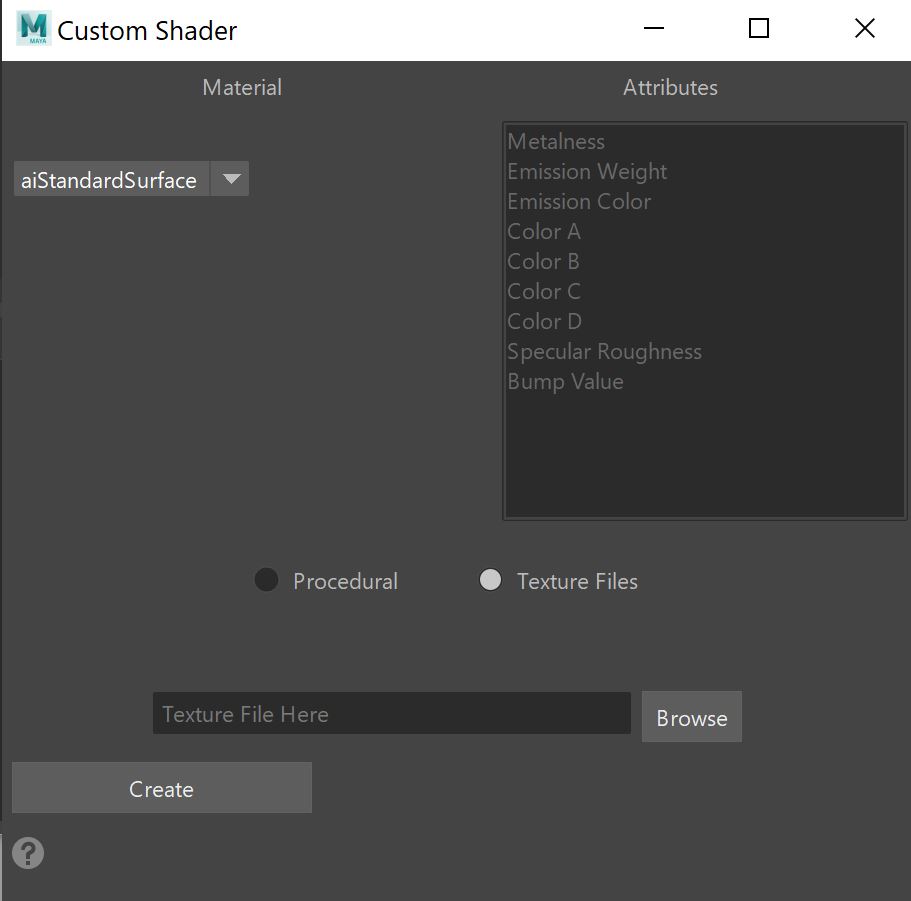
My idea was to create a Maya GUI that would prompt the user to select a material and decide between procedural and using texture files. There would be a scroll bar with the material’s attributes that the user can select to determine which ones would have an OSL script assigned to it. The GUI would then run my Python script that assigns the selected attributes to the shape nodes of the selected objects, create the selected material, input the OSL code and make all the correct connections in the HyperShade. The goal is to manipulate material attributes on individual objects with the same material without affecting the look of the other objects. This will ultimately optimize scene files with large amounts of objects in them.
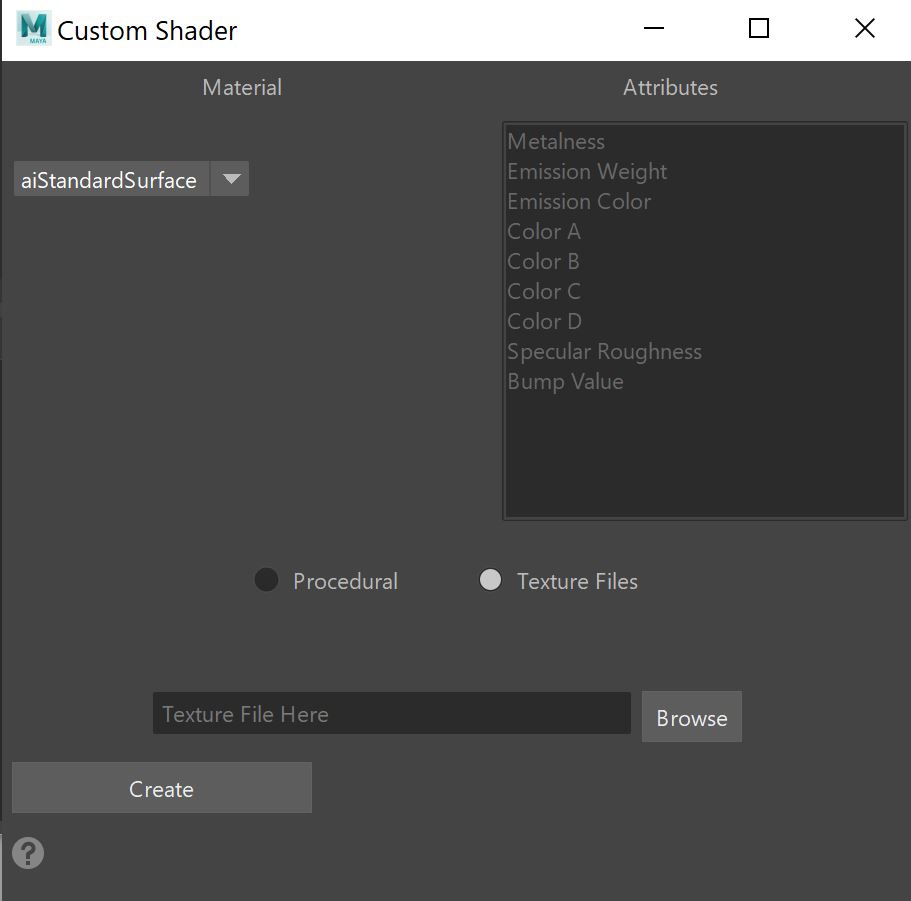
Current Features:
Future Features:
- Works with aiStandardSurface and aiToon
- Procedurally and with Texture Files
- If done procedurally, can work on any and all objects, regardless of UVs
- If done with texture files, the objects selected must have the same UVs
- Adds adjustable color correct and fresnel attributes on shape nodes
- Will work with more materials in Maya
- Will have error messages to help guide the user to make the appropriate selections
How to Use:
(If you would like the zipped files, please feel free to email me. Otherwise, you will have to copy and paste all of the modules into .txt or .py files on your own. The title of each module must be how it is presented on the drop downs.)
- Download .zip file
- Unzip and save ‘Custom_OSL_Shader_Amanda_Rabade’ in ‘/Users/<username>/Documents/maya/scripts’
- In Maya, copy and paste in a new Python tab in the script editor and run:
import sys
sys.path.append(‘C:/Users/<username>/Documents/maya/scripts/Custom_OSL_Shader_Amanda_Rabade’) < Windows
import sys
sys.path.append(‘~/Library/Preferences/Autodesk/maya/<version>/scripts/Custom_OSL_Shader_Amanda_Rabade’) < MAC
- Open ‘main.py’ in the script editor and run
- Pick material from drop down and select either ‘Procedural’ or ‘Texture Files’ then select geometry. (Can select geometry first, order doesn’t matter)
- Click ‘Create’
If ‘Texture Files’ is selected:
- A window will appear and prompt you to compile the OSL node in the HyperShade. The rest of the code will not run until this task is complete!
- Click ‘Done’ to finish the process
If ‘Procedural’ is selected:
Possible Errors:

If you receive this error, go back to How to Use and make sure you did steps 1-3
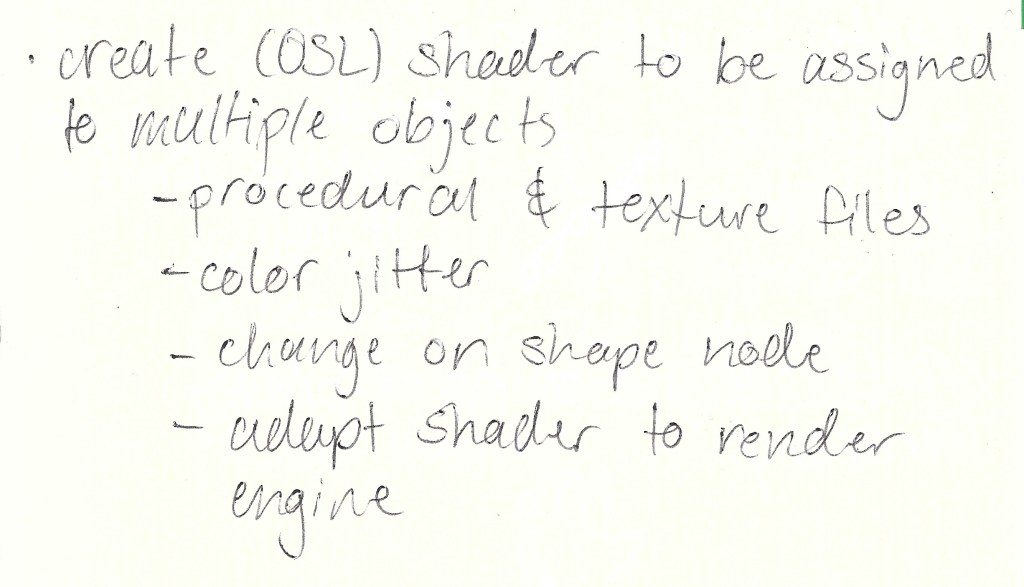
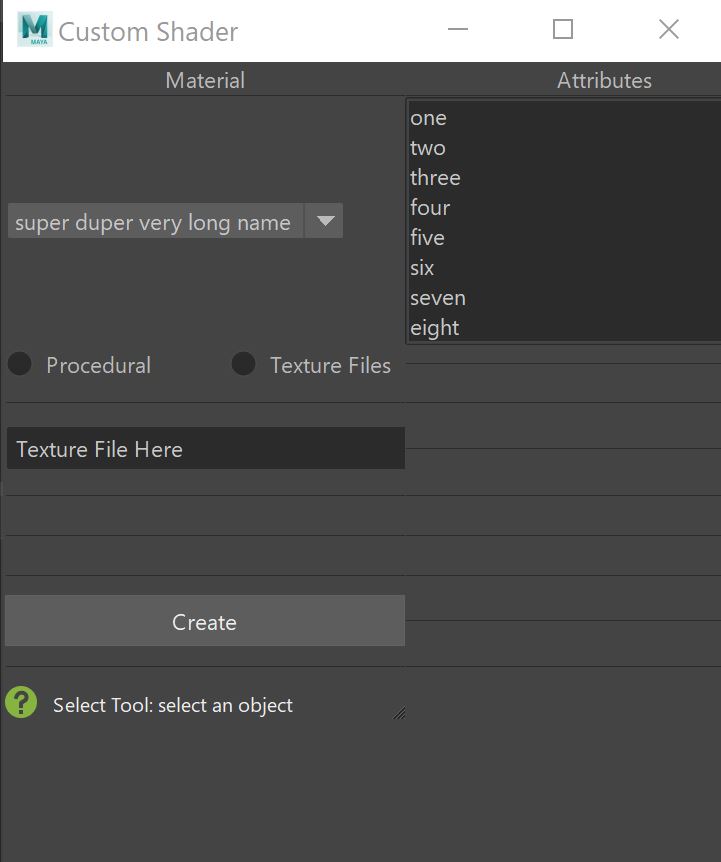
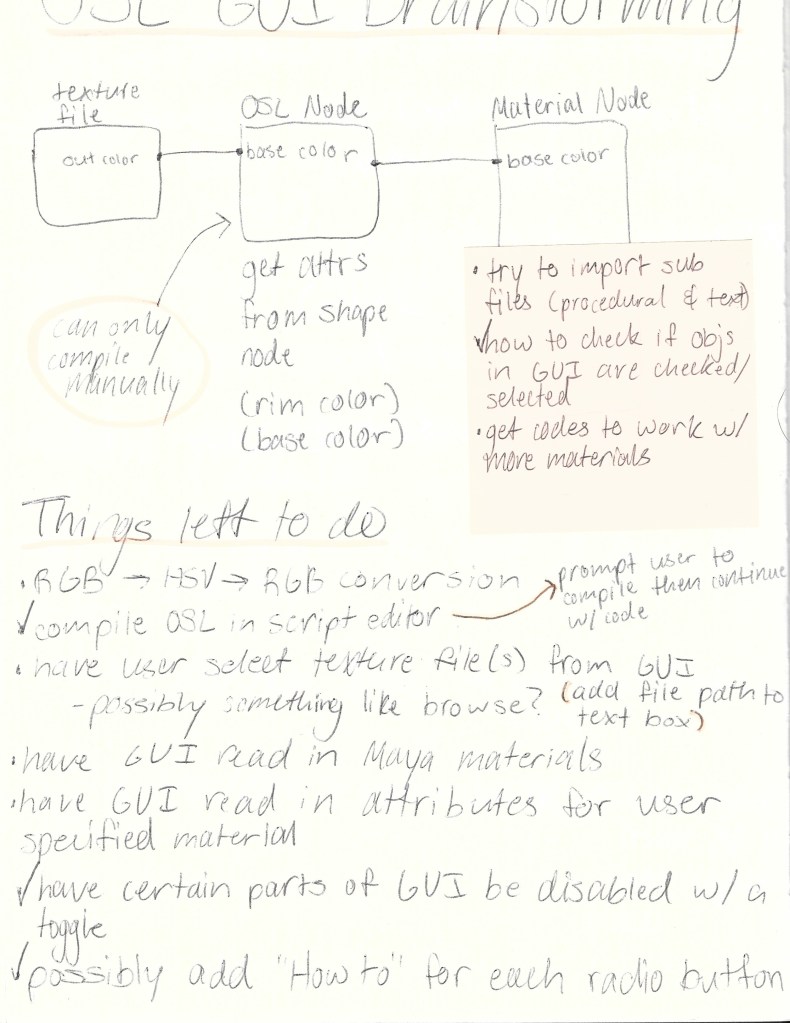
Ideation Process:



 3D Rigging & Look Development